
Smartphone vs Mirrorless Camera: Which Wins in 2026?
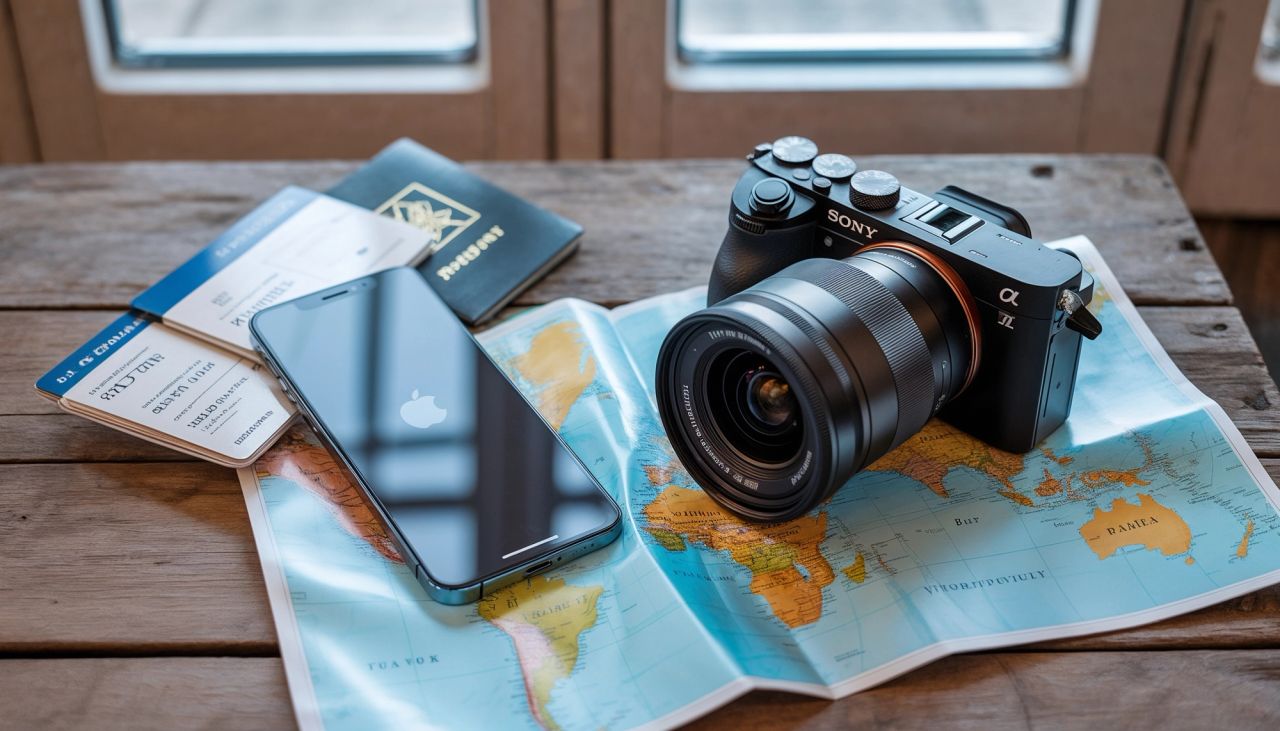
I've carried both for years, and I think the most honest answer is: a smartphone is the best camera for many moments — until it isn't. This post is my practical guide for knowing when a mirrorless camera is worth the size, weight, and cost.
💡Quick takeaway: If you primarily shoot in daylight and share to social media, your phone is excellent. Upgrade to mirrorless only if you regularly face challenging conditions: low light with movement, distant subjects, or desire extensive editing control.
TL;DR
- Smartphones win for convenience, speed, sharing, and "automatic great-looking" results.
- Mirrorless wins for low light, real background blur, lens flexibility (reach/macro), action reliability, and editing headroom.
- The "secret" is simple: bigger sensors + bigger lenses capture light differently — and software can only bend physics so far.
Quick Comparison
| Topic | Smartphone | Mirrorless |
|---|---|---|
| Portability | Always with you | You commit to carrying it |
| Low light | Very good for static scenes (Night Mode) | Strong for both static + moving scenes |
| Background blur | Often simulated (portrait mode) | Real optical blur, more natural edges |
| Zoom / reach | Limited; relies on digital zoom | Real telephoto lenses, better subject isolation |
| Action (kids/sports) | Improving, but can struggle in dim light | Usually more consistent tracking + burst |
| Editing | Great JPGs fast | RAW flexibility + consistency |
| Video | 8K, cinematic modes, instant sharing | Pro codecs, better rolling shutter, longer recording |
| Total cost | "Included" with phone | Body + lenses + accessories add up |
| Best for | Daily life, travel snaps, social | Creative control, prints, wildlife, events |
Why I even bring a mirrorless camera sometimes
There are days when I love my mirrorless kit… until hour five of walking, when my shoulder starts negotiating. My phone never complains. It's light, it's always there, and it's honestly impressive.
So the real question isn't "which is better?"
It's: when does a mirrorless camera actually earn its space in my bag?
Before we start: when I say mirrorless, I mean an interchangeable-lens camera that uses the sensor feed to show you the image (rear screen or electronic viewfinder) — no mirror mechanism like old DSLRs.
Sensor size: the quiet advantage that shows up everywhere
If there's one "foundational" difference, it's the sensor. A larger sensor usually means:
- cleaner low-light images
- more natural background blur (with the right lens)
- more dynamic range (especially in RAW)
- better results when you crop heavily or print large
What this means for you: if you rarely crop, rarely print, and mostly shoot in good light, you may not need a mirrorless camera, even if you want one.
Pixel pitch: the exact math (smartphone vs full-frame)
I'm a big fan of keeping this concrete. Below is a simple "sensor size + megapixels" comparison for one representative smartphone sensor vs one representative full-frame mirrorless sensor. (This is intentionally back-of-the-envelope: real sensors have microlenses, backside illumination (BSI), and model-to-model variation in quantum efficiency — but the intuition holds.)
Definitions
Sensor area (mm²) = width (mm) × height (mm)Pixel area (mm²) = sensor area / total pixelsConvert to µm²: 1 mm² = 1,000,000 µm²Pixel pitch (µm) ≈ √(pixel area in µm²)
Smartphone example (iPhone 16 Pro)
iPhone 16 Pro's main sensor is roughly 1/1.28", about 9.8 × 7.3 mm, and 48 MP.Sensor area = 9.8 × 7.3 = 71.54 mm²Total pixels = 48,000,000Pixel area = 71.54 / 48,000,000 = 0.0000014904 mm²Pixel area in µm² = 0.0000014904 × 1,000,000 = 1.4904 µm²Pixel pitch = √(1.4904) = 1.22 µmSo smartphone pixel pitch is ~1.22 µm, pixel area ~1.49 µm².
Note: 2026 flagship phones like the Samsung Galaxy S25 Ultra and Google Pixel 9 Pro now feature sensors approaching 1/1.14" — slightly larger still, though the fundamental physics gap remains.
Full-frame mirrorless example (Sony A7 IV)
Full-frame sensor: 36 × 24 mm. A7 IV: 33 MP.Sensor area = 36 × 24 = 864 mm²Total pixels = 33,000,000Pixel area = 864 / 33,000,000 = 0.0000261818 mm²Pixel area in µm² = 0.0000261818 × 1,000,000 = 26.18 µm²Pixel pitch = √(26.18) = 5.12 µmSo full-frame pixel pitch is ~5.12 µm, pixel area ~26.18 µm².How much bigger is a full-frame pixel (by area)?26.18 / 1.49 ≈ 17.6× larger (area).
Let that sink in: each pixel on a full-frame sensor collects nearly 18 times more light than a smartphone pixel. That's not a minor difference — it's almost two orders of magnitude. This single fact explains why mirrorless cameras perform better in low light, produce cleaner high-ISO images, and capture more dynamic range. No amount of computational photography can fully overcome an 18× disadvantage in light-gathering ability.
That's the core physics advantage: a larger pixel is a larger "bucket" for light. For context, the "sweet spot" for pixel pitch (balancing noise, detail, and avoiding moiré) is generally considered 4–9 µm — full-frame sensors sit comfortably in this range, while smartphones rely on computational tricks to compensate.
Pixel binning: the smartphone's secret weapon
Phones fight back with smart engineering. Most modern smartphones use a technique called pixel binning to overcome their small sensor disadvantage.
How it works:
Your phone's 48MP or 108MP sensor doesn't always shoot at full resolution. In challenging light, the phone combines adjacent pixels into larger "super pixels" that can capture more light.
Let's make this concrete: a 108MP sensor with 9:1 binning (Nona Bayer) combines nine tiny pixels into one larger pixel, resulting in a 12MP image. Each binned pixel is now 9× the size of the original, which means it can gather 9× more light. This is why phones like the Samsung Galaxy S20 Ultra shoot at 12MP in Night and Pro modes rather than the full 108MP.
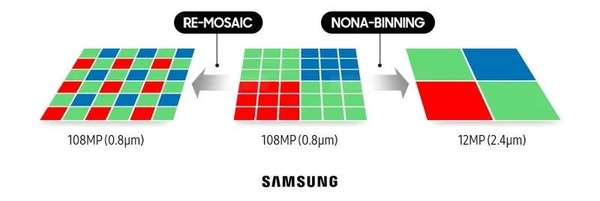
| Binning Type | Pixels Combined | Result |
|---|---|---|
| No binning | 1 pixel | 48MP full resolution (bright daylight) |
| Quad Bayer (2x2) | 4 pixels -> 1 | 48MP becomes 12MP |
| Nona Bayer (3x3) | 9 pixels -> 1 | 108MP becomes 12MP |
Why this matters: A binned pixel collects significantly more light than a single tiny pixel, which means less noise and cleaner images in dim conditions. The trade-off is resolution. You're getting a 12MP image instead of 48MP or 108MP, but in low light, that's usually a worthwhile exchange.
The catch: Even with 9:1 binning, a smartphone pixel is still smaller than a mirrorless camera pixel. A 108MP sensor binned to 12MP gives you an effective pixel pitch of ~2.4 µm, while a 33MP full-frame sensor has ~5.12 µm pixels. The mirrorless pixel is still ~4.5× larger by area, and it doesn't need to sacrifice resolution to get there.
What this means for you: Pixel binning is genuinely clever engineering, and it's why modern phones perform so well in moderately low light. But when conditions get really challenging (very dark + movement), the physics gap still shows.
Low light and noise (visual intuition)
In my experience, the "break point" isn't only darkness — it's darkness + movement (kids, people walking, handheld indoor scenes).
I shot my daughter's birthday in a dimly lit restaurant (roughly 50 lux — typical indoor event lighting). My phone captured beautiful shots of the cake… but every candid of her running to open presents was soft or ghosted. My mirrorless (Sony A7 IV at ISO 6400, 1/250s) nailed the moment.
Real-world comparison (same scene, same moment)
| Setting | iPhone 16 Pro | Sony A7 IV + 35 f/1.4 |
|---|---|---|
| Lightning | Indoor restaurant | Same |
| ISO | Auto (estimated 3200) | 6400 |
| Shutter Speed | ~1/30s (Night Mode multi-frame) | 1/250s |
| Result | Sharp if still, ghosting if moving | Consistently sharp |
What this means for you: if you shoot indoors a lot (family, events, restaurants) and you want consistently clean results, mirrorless starts to feel worth it.
Dynamic range (HDR vs RAW flexibility)
Phones are excellent at HDR by blending multiple frames. Mirrorless cameras often preserve more highlight/shadow detail per frame, and RAW editing gives you more room before the image falls apart.
What this means for you: if you enjoy editing (or want to learn), mirrorless RAW files are usually more forgiving.
Depth of field: why "f/1.8" on a phone doesn't feel like "f/1.8" on full-frame
I used to see f/1.8 on my phone and think: Okay, that's fast — I'm basically set for portraits.
Then I started comparing the look in real photos. The phone could blur backgrounds, sure… but it often looked different, especially around hair, glasses, and busy edges.
Here's the key idea: the f-number belongs to the lens, but sensor size changes how that aperture behaves in terms of depth of field and subject separation (especially when you match framing).
A useful "gut check" (very rough): with the example phone sensor above, the crop factor is about 3.54×, so f/1.8 on a phone can behave roughly like ~f/6.3 on full-frame for depth of field when you match framing.
Important caveat: this equivalence applies only to depth of field (how much is in focus), not to light gathering. Your phone at f/1.8 still collects the same amount of light per unit area as a full-frame lens at f/1.8 — the difference is in how much of your scene falls within the plane of acceptable sharpness. Different phones/modules vary, but the direction is the important part.
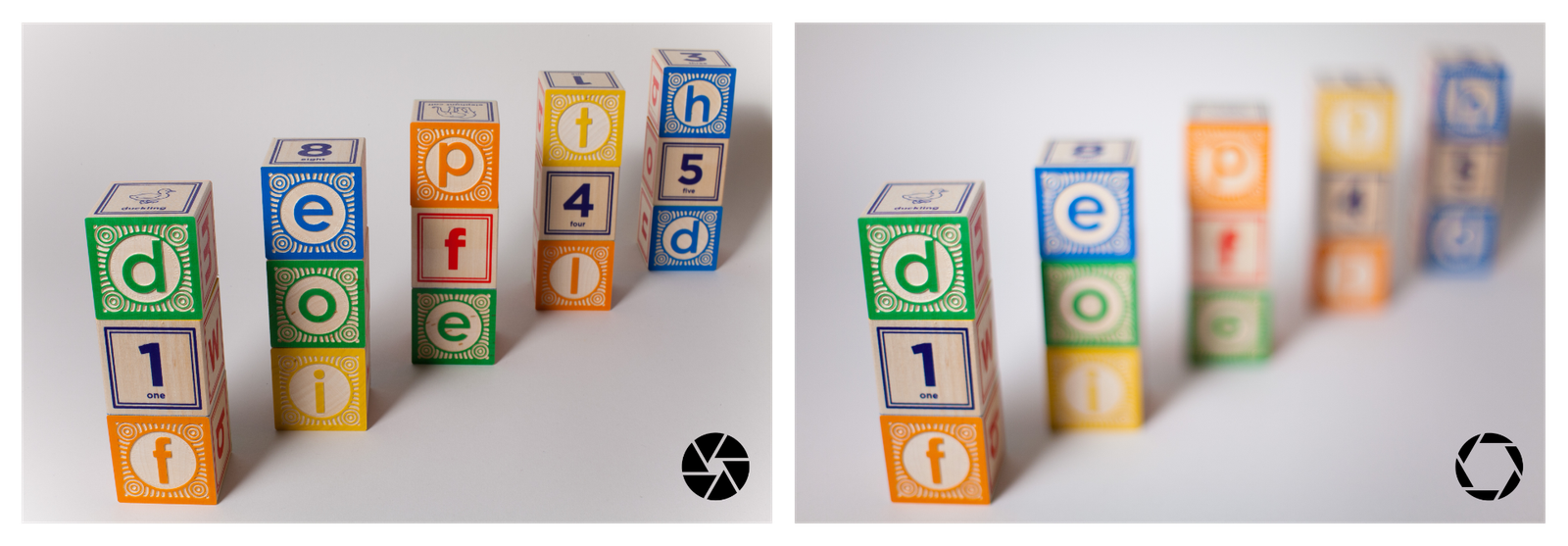
Try it yourself (takes ~1 minute):
I built a depth-of-field calculator — compare a smartphone-sized sensor vs full-frame, keep subject distance similar, and watch how quickly the depth of field changes.
→ Depth of Field Calculator
Did the calculator surprise you? I'd love to hear what you discovered — share your crop factor revelation in the comments below.
Quick experiment to try:
- Subject distance: 1 m
- Compare: Phone sensor vs Full-frame (36×24)
- Keep framing similar (phone main camera vs ~24–28mm full-frame, or phone "portrait" camera vs ~50–85mm full-frame)
Real-World Portrait Comparison: iPhone 16 Pro vs Fuji X-T5
 Fuji X-T5 + Viltrox 75mm f/1.2 at f/1.2 (112mm equivalent): Real optical blur keeps the entire face uniformly sharp while the background falls away naturally with creamy bokeh.
 iPhone 16 Pro Portrait Mode (f/1.8, 65mm equivalent): Notice how the right eye and right side of the face are softer than the left, despite being the same distance from the camera — a telltale sign of computational depth estimation.
| Fuji X-T5 + Viltrox 75mm f/1.2 | iPhone 16 Pro (Portrait Mode) | |
|---|---|---|
| Aperture | f/1.2 (optical blur) | f/1.8 (computational blur) |
| Focal Length | 112mm equivalent (1.5x crop factor) | 65mm equivalent |
| Blur Method | Real optical physics | AI depth mapping + software simulation |
| Focus Plane | Uniform across same distance | Inconsistent (see right eye/face) |
What I Notice
Background Rendering: The Fuji produces that classic "creamy" bokeh with smooth, circular highlights that roll off naturally. The iPhone's computational blur is impressive, but look closely at the background elements — the transition between in-focus and out-of-focus areas is more abrupt, and some highlights have a slightly processed quality.
Focus Plane Consistency (The Most Telling Difference): Look closely at the eyes. In the iPhone version, the left eye is tack sharp, but the right eye and right side of the face are noticeably softer — almost out of focus. Here's the problem: both sides of his face are the same distance from the camera. There's no optical reason for this inconsistency. This is computational blur making an incorrect depth estimation, applying background blur to parts of the subject that should be sharp. The Fuji, using real optics, keeps the entire face in the same focus plane as physics dictates.
Hair Edge Detail: The Fuji captures every strand with the background falling away naturally behind them. The iPhone's AI has to make decisions about what's foreground vs background — and with fine details like hair, you can sometimes see slight haloing or edge artifacts where the algorithm wasn't quite sure.
Subject Separation: The mirrorless image has more "three-dimensional" quality. My son genuinely pops from the background because the blur is created by real optics, not estimated depth maps. The iPhone does a remarkable job for a phone, but the separation feels slightly flatter.
Skin Tones and Detail: The Fuji's larger sensor captures more subtle tonal gradations. The iPhone applies more aggressive processing to compensate for its smaller sensor — skin looks good, but slightly smoother than reality.
The Honest Assessment
iPhone 16 Pro Portrait Mode: Genuinely impressive for a smartphone. If you're sharing to Instagram or keeping digital memories, this is more than good enough for 90% of situations. The convenience factor is unbeatable.
Fuji X-T5 + Viltrox 75mm f/1.2: This is what you pay for with dedicated gear — real optical physics that no algorithm can fully replicate. For prints, for moments that matter, for that professional "look" — the mirrorless camera delivers something the phone simply cannot simulate.
My Takeaway
This comparison perfectly illustrates my main point: Portrait Mode is great — until you compare it to real optical blur. The phone makes excellent photos. The mirrorless makes different photos — with a depth and dimensionality that computational photography hasn't cracked yet.
For everyday shots of the kids? I grab my phone. For portraits I'll print or treasure? I reach for the Fuji.
Technical Details:
- iPhone 16 Pro: Portrait Mode, 65mm equivalent, f/1.8
- Fuji X-T5: Viltrox 75mm f/1.2 XF (112mm equivalent), shot wide open at f/1.2
- Both images: Same location, overcast natural light, within 30 seconds of each other
- Minimal post-processing on both to show native rendering differences
What this means for you: portrait mode is great, but real optical blur is still more natural when the scene gets complicated.
💡Key Insight: The mirrorless advantage isn't about "better quality" in the abstract — it's about reliability in difficult conditions. When everything goes right, phones look great. When conditions get challenging, mirrorless cameras are more forgiving.
Interchangeable lenses: the reason mirrorless can feel like "cheating"
The first time I used a real telephoto lens — a Canon EF 100-400mm f/4-f/5.6 L — I remember thinking: Oh… this is why people carry these cameras. At 400mm, I could isolate a single face in a crowd with compression and bokeh my phone couldn't simulate. Not because the phone was bad — but because the mirrorless lens could do something the phone simply couldn't.
Travel example: In Iceland last year, my phone's ultra-wide was excellent for the vast landscapes — black sand beaches, glacial lagoons, dramatic skies. But when I spotted puffins on a cliff about 50 meters away, only the 400mm lens could capture them properly. My phone's 5x zoom produced a mushy, over-processed crop. The mirrorless gave me a sharp, printable image.
Smartphones try to cover this with multiple camera modules (ultra-wide, main, tele), and that's genuinely useful. But there are still gaps:
- the best quality is often from the main camera
- digital zoom fills in the rest (and quality drops fast)
- you can't truly swap optics for the task
Real-World Telephoto Comparison: iPhone 16 Pro (18x) vs Fuji X-T5 (400mm)
To demonstrate this, I set up a simple test: my LEGO R2-D2 on a ledge, photographed from the same distance with both cameras. I adjusted the iPhone to 18x zoom to match the framing of my Fuji X-T5 with the FUJIFILM XF 100-400mm f/4.5-5.6 R LM OIS WR lens at 400mm.
The results speak for themselves.
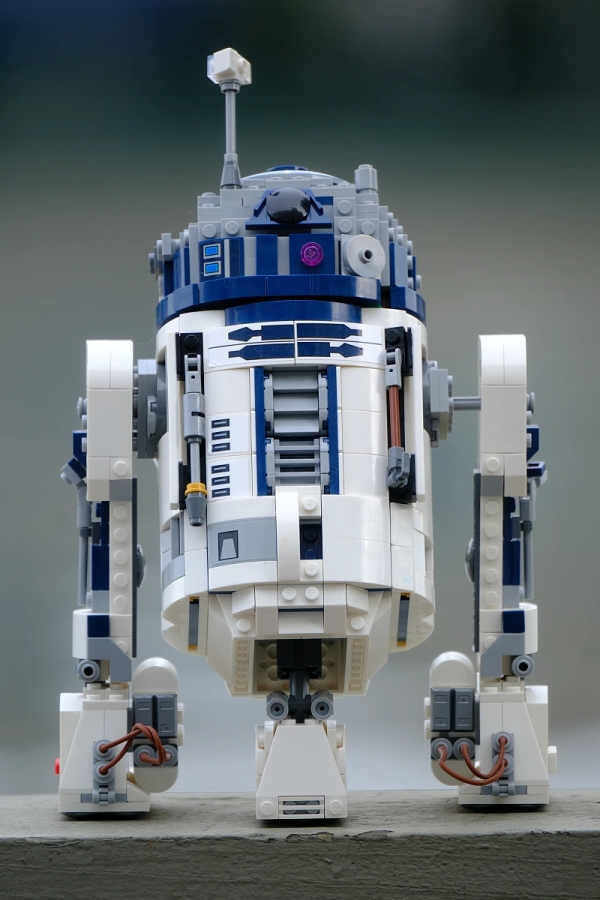 Fuji X-T5 + FUJIFILM XF 100-400mm f/4.5-5.6 R LM OIS WR at 400mm (600mm equivalent): Real optical reach delivers razor-sharp detail with beautiful background separation. This is what ~$4200 in camera + telephoto glass buys you.
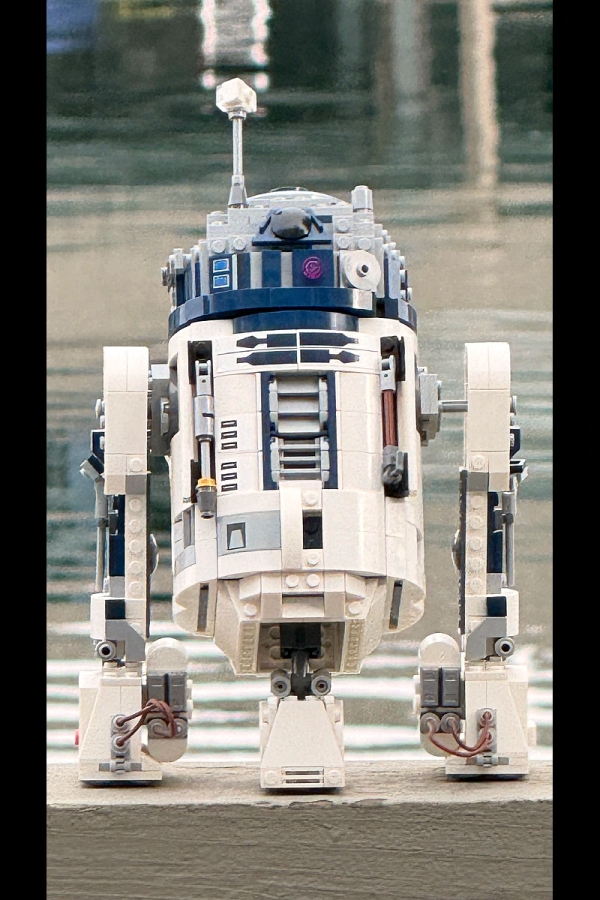 iPhone 16 Pro at 18x zoom: Digital upscaling creates visible artifacts, smeared textures, and fails to separate the subject from the busy background. Usable for social media, but not for prints.
| Fuji X-T5 + FUJIFILM XF 100-400mm f/4.5-5.6 | iPhone 16 Pro (18x Digital Zoom) | |
|---|---|---|
| Zoom Method | 400mm optical (600mm equivalent) | 18x hybrid/digital zoom |
| Native Optical | Full 400mm optical reach | 5x (120mm equivalent) |
| Background | Smooth, creamy bokeh | Busy, poorly separated |
| Detail Quality | Tack sharp, clean edges | Artifacts, smearing, noise |
What I Notice
Detail and Sharpness: The Fuji image is razor sharp. Every LEGO stud, every panel line, every tiny detail on R2-D2 is crisp and well-defined. The iPhone? It's trying hard — you can tell the computational photography is working overtime — but the result is soft, with visible artifacts and a "painted" quality where fine detail should be.
Background Separation: This is where the 400mm optical advantage really shows. The Fuji's long focal length creates beautiful background compression with smooth, creamy bokeh. The water behind R2-D2 melts into soft abstract tones. The iPhone's background remains busy and distracting — digital zoom can crop tighter, but it can't replicate the optical physics of a real telephoto lens.
Noise and Artifacts: Zoom in on the iPhone image and you'll see the telltale signs of aggressive computational upscaling: smeared textures, haloing around edges, and color noise in the shadows. The Fuji image stays clean because it captured all that detail optically — no algorithmic guesswork required.
Color and Contrast: The Fuji renders colors more accurately with better micro-contrast. The white panels on R2-D2 have subtle tonal gradations. The iPhone's processing tends to flatten these nuances while boosting overall contrast to mask the noise.
The Cost Reality
Let's be honest about what this telephoto capability costs (prices as of January 2026):
| Setup | Price |
|---|---|
| iPhone 16 Pro | ~$1,000 (but you're buying a phone anyway) |
| Fuji X-T5 body | $1,999 |
| FUJIFILM XF 100-400mm f/4.5-5.6 R LM OIS WR | $2,249 |
| Fuji telephoto setup total | $4,248 |
That's a significant investment for reach. But if you regularly photograph wildlife, sports, or distant subjects — and you want printable, professional results — there's simply no phone that can match what a real telephoto lens delivers.
My Takeaway
This comparison perfectly illustrates the "Super resolution vs optical zoom" gap I mentioned in the table above. At 5x and below, modern phones are genuinely competitive. Push beyond that into digital zoom territory, and you're asking software to invent detail that was never captured.
The iPhone at 18x is usable for social media or quick documentation. But the Fuji at 400mm is printable — it's the difference between "good enough" and "exactly what I envisioned."
Is $4,200+ worth it for telephoto reach? For most people, no. But for wildlife photographers, sports shooters, or anyone who regularly needs to reach distant subjects — it's not even close.
Technical Details:
- iPhone 16 Pro: 18x zoom (hybrid/digital), handheld
- Fuji X-T5: FUJIFILM XF 100-400mm f/4.5-5.6 R LM OIS WR at 400mm (600mm equivalent), handheld with OIS
- Both images: Same subject, same distance, same lighting conditions
- Minimal post-processing to show native rendering differences
Super resolution vs optical zoom: actual comparison
| Zoom level | Phone (digital/hybrid) | Mirrorless (optical) |
|---|---|---|
| 2x | Near-native quality | Native quality |
| 5x | Noticeable softening | Native quality (with right lens) |
| 10x | Heavy processing artifacts | Native quality (with telephoto) |
| 18x+ | Severe artifacts, unusable for print | Native quality (with super-telephoto) |
Why Interchangeable Lenses Matter in Practice
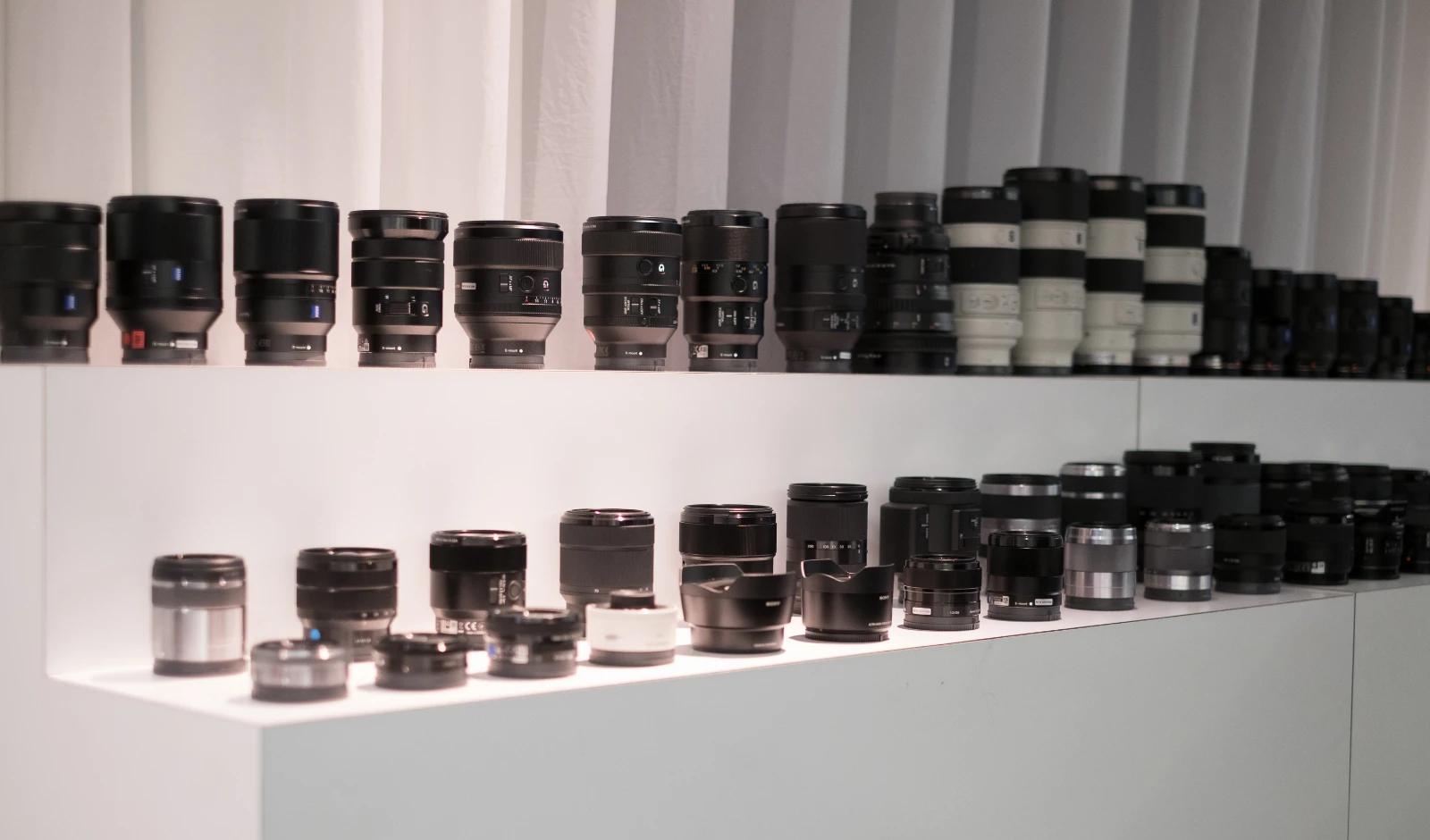
The R2-D2 comparison above demonstrates the telephoto advantage — but the same principle applies across every lens category. Each specialized lens does something a smartphone physically cannot replicate:
- Telephoto (100-400mm+): Real optical reach with true subject isolation. Digital zoom is just cropping and upscaling — optical zoom captures actual detail that was never there in a phone's cropped image.
- Fast Primes (f/1.2–f/1.8): Natural bokeh and superior low-light performance. As we saw in the portrait comparison, small sensors physically can't produce equivalent depth of field — no amount of computational blur can match real optical separation.
- Ultra-Wide (10-18mm): Expansive field of view with controlled distortion and sharp corners. Phone ultra-wides suffer from heavy barrel distortion, edge softness, and compromised detail — fine for social media, but visible in prints.
- Macro (1:1 magnification): True close-focus capability with life-size reproduction. Phone "macro modes" are typically just the ultra-wide camera shooting close, resulting in distortion and limited detail. A real macro lens reveals worlds invisible to smartphones.
- Tilt-Shift: Perspective control for architecture and creative focus planes. No phone equivalent exists — this is pure optical physics that cannot be simulated after the fact.
The pattern is consistent: smartphones simulate these effects computationally, while dedicated lenses achieve them optically. Computational approaches work well enough for social sharing, but they break down when you need precision, print-quality results, or edge-case scenarios.
We demonstrated the gap at 400mm with R2-D2. But if I did the same comparison with a macro lens shooting a tiny insect, or an ultra-wide shooting architecture, or a fast prime in a dark venue — the conclusion would be identical: real glass captures what software can only approximate.
What this means for you: if your subjects include wildlife, sports, stage performances, architecture, macro subjects, or anything requiring specialized optics — mirrorless isn't just "better," it's playing a different game entirely.
Electronic viewfinder: the underrated "comfort feature"
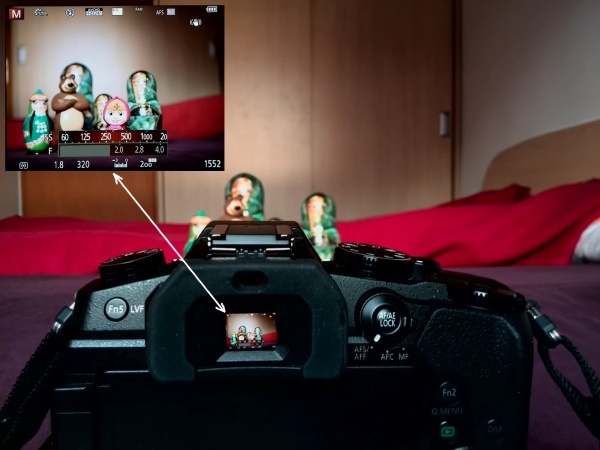
I used to think an EVF was just a “nice-to-have” until I started shooting in harsh sunlight. Phone screens turn into mirrors outdoors — you crank brightness, squint, shade the screen, and still end up guessing exposure and focus. With an EVF, ambient light disappears. You see the image clearly, which makes framing and timing feel much more confident.
The other underrated benefit is stability. Putting the camera to your eye gives you a naturally steadier stance (elbows in, camera supported against your face). That small ergonomic change means fewer slightly-soft shots when you’re tired, walking, or shooting quickly — and it matters even more when you’re zoomed in with a telephoto lens.
EVFs also help you “get it right” before you press the shutter. Exposure and white balance preview in real time, so backlit portraits, stage lighting, or bright skies are easier to judge. And the overlays are genuinely useful: histogram or highlight warnings to protect bright areas, a lev
Computational photography: where smartphones are genuinely brilliant
Phones don't just take a photo — they run a pipeline: multi-frame capture, alignment, noise reduction, HDR merge, face detection, tone mapping… and you get a polished result instantly.
In my opinion, this is the phone's biggest advantage.
How multi-frame fusion actually works
When you tap the shutter on a modern smartphone, you're not taking one photo — you're capturing 9–12+ frames in rapid succession. The phone's ISP (Image Signal Processor) then:
- Aligns frames to correct for hand movement
- Stacks them to reduce noise (more data = cleaner image)
- Merges different exposures for HDR
- Applies AI semantic segmentation — 2025 chipsets like the Snapdragon 8 Elite and MediaTek Dimensity 9400 identify scene elements (sky, faces, background) and process each differently
This is genuinely impressive engineering. But it has limits.
Where phones often shine:
- HDR in difficult light (backlit scenes)
- night mode for static subjects
- "good color" without editing
- fast sharing and quick edits
Where phones can still struggle
| Scenario | What happens | Why |
|---|---|---|
| Moving subjects in night mode | Ghosting, blur, smearing | Multi-frame alignment fails when subject moves between frames |
| Handheld portraits >1s equivalent | Soft faces, sharp backgrounds | Subject moves during capture window |
| Heavy noise reduction | "Waxy" skin textures | Aggressive AI smoothing to hide noise |
| Portrait mode edges | Hair/glasses errors | AI segmentation isn't perfect on complex boundaries |
| Digital zoom past 5x | Mushy details, artifacts | Super resolution has limits |
What this means for you: if your goal is consistently nice images with minimal effort, phones are hard to beat — as long as your subjects cooperate by staying still.
Autofocus and speed: the "kids running indoors" test
This is where I personally notice the difference most: not in perfect light — but in messy, real-life light.
Sports example: At my nephew's soccer game at dusk (that tricky 30 minutes before the lights fully compensate), my phone struggled to track him reliably — lots of soft shots, focus hunting between players. The mirrorless with a 70-200mm locked on and didn't let go. Out of 50 burst shots, maybe 3 were soft. On the phone, it was closer to half.
Mirrorless cameras usually offer:
- more reliable subject tracking (people/animals/vehicles)
- minimal shutter lag
- better sustained burst shooting (useful for action moments)
- better performance when light is low and subjects move
Phones are improving fast, but action in dim light is still a common weak spot.
What this means for you: if you often photograph kids, sports, pets, or events, mirrorless consistency is a real quality-of-life upgrade.
💡The real question: Don't ask "which camera is better?" Ask "what do I actually shoot, and where does my current camera frustrate me?" If the answer is "nowhere" — keep your phone. If you have specific pain points, a mirrorless camera might solve them.
Video: the 2025-2026 consideration
Video capability has become a major factor in camera choice:
Smartphone video strengths:
- 8K recording on flagship models
- Cinematic modes with rack focus simulation
- Instant editing and sharing
- Always in your pocket
Mirrorless video strengths:
- Professional codecs (ProRes, All-I, 10-bit)
- Better rolling shutter performance
- Superior continuous autofocus tracking
- Longer recording times without thermal throttling
- External monitor/recorder support
- Real shallow depth of field
The thermal reality
Phones can overheat during extended 4K recording (especially in direct sunlight). Mirrorless cameras are designed for longer recording sessions.
What this means for you: for quick social clips, phones excel. For serious video work, interviews, or anything over 10-15 minutes, mirrorless is more reliable.
Workflow: the "hidden cost" people don't talk about
A mirrorless camera often comes with:
- importing files
- backing up
- editing (especially if you shoot RAW)
- managing lenses, batteries, cards
A phone is frictionless.
Real workflow time comparison
| Task | Phone | Mirrorless |
|---|---|---|
| Capture to shareable | 30 seconds | 2–5 minutes per image (RAW editing) |
| Backup | Automatic (iCloud/Google Photos) | Intentional (cards → drive → cloud) |
| Culling 100 photos | Swipe in gallery | Import → rate → cull in Lightroom |
| Storage per 1,000 shots | ~3–8 GB (HEIF/JPG) | ~25–60 GB (RAW) |
Cloud sync has improved
The smartphone-to-cloud-to-desktop workflow has gotten much better. Apps like Lightroom Mobile now let you capture phone RAW and edit seamlessly across devices. If you want phone convenience with more editing control, this is worth exploring.
RAW workflow benefits
RAW files are "future-proof" in a way JPGs aren't. As AI editing tools improve, your RAW files gain value — you can re-edit with better algorithms. Phone JPGs have processing "baked in" that can't be undone.
What this means for you: if you know you won't edit (and you don't want to), a phone might fit your life better — and that's totally valid.
Storage and future-proofing
This is a consideration many overlook:
File size reality
| Format | Typical size | 1TB holds... |
|---|---|---|
| Phone HEIF/JPG | 3–8 MB | ~125,000–330,000 photos |
| Mirrorless RAW | 25–60 MB | ~16,000–40,000 photos |
| Mirrorless RAW + JPG | 30–70 MB | ~14,000–33,000 photos |
Future AI editing
Here's something to consider: RAW files contain all the original sensor data. As AI editing tools improve (and they're improving fast), your RAW archive becomes more valuable — you can re-process old shots with new algorithms.
Phone JPGs have processing decisions "baked in." That Instagram-ready look from 2024 might feel dated by 2028, and there's less you can do about it.
What this means for you: if you're building a long-term photo archive, RAW offers more flexibility. If you shoot casually and don't revisit old photos, this doesn't matter.
Cost comparison: the real math
Let's be honest about what you're actually spending:
Smartphone path
- Flagship phone (2026): $1,000–$1,400
- You were probably buying a phone anyway
- Camera is "free" with device
Entry mirrorless path
- Entry full-frame body (Sony A7C II, Canon R8): $1,400–$1,700
- Kit zoom lens: included or ~$300
- One fast prime (35mm or 50mm f/1.8): $200–$450
- SD cards, bag, extra battery: $150–$250
- Total: ~$1,750–$2,400
APS-C alternative (lighter, cheaper)
- APS-C body (Sony A6700, Fuji X-T5): $1,000–$1,400
- Smaller/lighter lenses available
- Still significantly better than phones in low light
- Good middle-ground if full-frame feels excessive
What this means for you: mirrorless is a real investment on top of the phone you're already buying. Make sure you'll use it enough to justify it.
Recommended cameras for phone upgraders (2026)
If you've decided mirrorless is right for you, here are my current recommendations as of January 2026:
Entry full-frame (~$1,400–$1,700 body only)
| Camera | Why consider it | Best for |
|---|---|---|
| Sony A7C II | Compact body, excellent AF, great for travel | Travelers who want full-frame in a small package |
| Canon EOS R8 | Lightweight, affordable entry to RF mount, excellent video | Budget-conscious upgraders, video shooters |
| Nikon Z5 | Solid build, in-body stabilization, good value | Landscape and portrait photographers |
APS-C middle ground (~$1,000–$1,400 body only)
| Camera | Why consider it | Best for |
|---|---|---|
| Sony A6700 | Compact, pro-level AF, excellent video | Hybrid photo/video, travel |
| Fujifilm X-T5 | Retro controls, film simulations, 40MP | Enthusiasts who enjoy the shooting experience |
| Canon EOS R7 | Fast burst, wildlife-ready AF | Sports and wildlife on a budget |
First lens suggestions
| Use case | Recommendation | Why |
|---|---|---|
| General purpose | 24-70mm f/4 or kit 28-70mm | Versatile range, manageable size |
| Low light / portraits | 35mm or 50mm f/1.8 | Fast aperture, affordable, sharp |
| Budget telephoto | 70-300mm f/4.5-6.3 | Reach without breaking the bank |
| Travel prime | 35mm f/2.8 or 40mm f/2.5 | Compact, versatile focal length |
My personal kit (for reference)
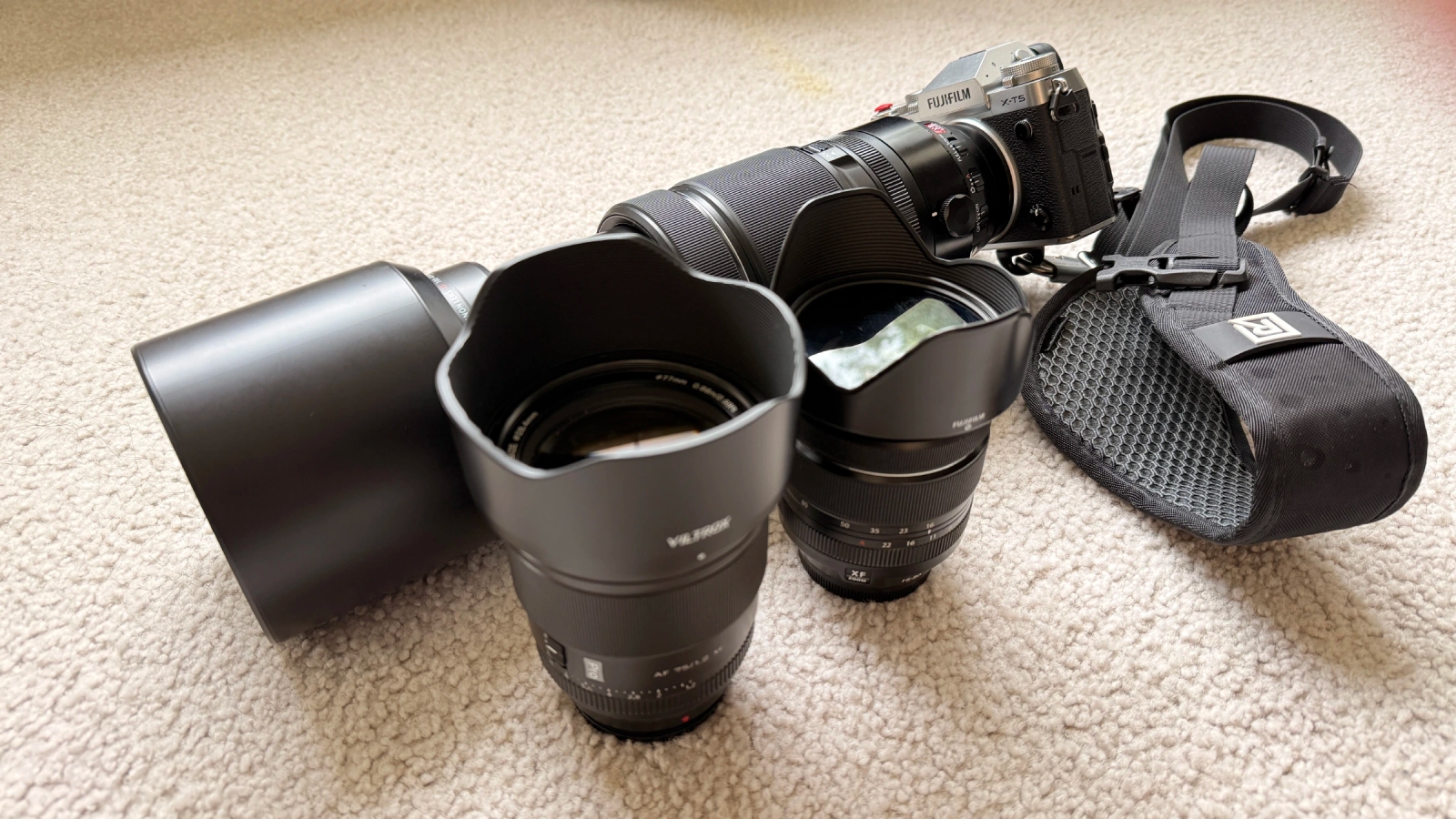
My travel kit: Fuji X-T5 with the lenses that have taken me around the world
- FUJIFILM X-T5 — 40MP APS-C body with stunning image quality, classic handling, and Fuji's renowned film simulations. It's the heart of my kit.
- FUJIFILM XF 16-80mm f/4 R OIS WR — My most-used lens. The 24-122mm equivalent range covers everything from landscapes to casual portraits. Weather-sealed, stabilized, and sharp enough that I rarely feel limited. This stays on the camera 70% of the time.
- FUJIFILM XF 100-400mm f/4.5-5.6 R LM OIS WR — When I know I'll need reach: wildlife, sports, or travel where I can't get close. Yes, it's big. Yes, it's worth it. The R2-D2 comparison above shows exactly why.
- Viltrox 75mm f/1.2 XF — My portrait secret weapon. At f/1.2 on APS-C, the background melts away with real optical bokeh — as the portrait comparison of my son demonstrates. Incredible value for the quality.
- BlackRapid Curve Breathe Strap — A comfortable cross-body strap that distributes weight during long shoots. Essential when carrying the 100-400mm.
- DJI Osmo Pocket 3 — Lightweight gimbal camera for vlogging. Fits in my bag without adding bulk, and the stabilization is remarkable for travel videos.
- PGYTECH OneMo Lite Backpack — Holds all three lenses plus the body. Thoughtfully designed, but make no mistake — fully loaded, this kit is heavy. After a few hours of shooting, your shoulders know it.
- iPhone 16 Pro — Always in my pocket. Handles the casual, spontaneous moments because the best camera is the one you have with you.
The phone handles 60% of my shooting. The mirrorless handles the moments I know matter.
A note on what you don't see in that photo: sixteen years of learning, experimenting, and refining. The galleries on this site look effortless to browse — a click here, a scroll there. But behind each image is a journey of figuring out what works, what doesn't, and slowly building the instincts to recognize the difference. The gear matters less than you think. The years behind the viewfinder matter more.
If you're curious about why I switched from Canon full-frame to Fuji APS-C, I wrote about that journey here: Embracing Change: My Transition from Canon 5D Mark IV to Fujifilm X-T5
Still torn between the two interchangeable-lens families themselves? My DSLR vs mirrorless guide breaks that decision down.
Common mistakes when choosing between phone and mirrorless
Mistake 1: Buying mirrorless but never editing RAW
The issue: You're paying for editing flexibility you don't use. The camera sits in Auto mode producing JPGs that don't look much different from your phone.
Better approach: Start with your phone + learn editing fundamentals using Lightroom Mobile. Once you're comfortable with RAW editing and want more, then upgrade.
Mistake 2: Expecting phone-level convenience from mirrorless
The issue: Frustration with importing, culling, editing, and backup leads to abandoned gear collecting dust.
Better approach: Accept that workflow friction is part of the craft. If you're not willing to embrace it, stick with your phone — it's not a lesser choice.
Mistake 3: Buying full-frame as a first interchangeable-lens camera
The issue: Heavy body, expensive lenses, potentially overwhelming feature set. Many beginners never progress past Auto mode.
Better approach: Consider APS-C first (lighter, cheaper, still excellent). Or rent full-frame for a weekend before committing.
Mistake 4: Comparing phone at 5x zoom to mirrorless kit lens
The issue: Neither is optimized for distance. The comparison is unfair and uninformative.
Better approach: Compare phone main camera to mirrorless + quality prime, or phone tele camera to mirrorless + proper telephoto lens.
Mistake 5: Ignoring video if you shoot any social content
The issue: Phones excel at quick video for social; mirrorless video workflow is slower and requires more learning.
Better approach: Be honest about what you'll actually shoot. Use phone for casual video, mirrorless for stills. Or commit to learning both workflows properly.
Mistake 6: Buying based on specs instead of handling
The issue: Ergonomics, menu systems, and button layouts vary dramatically. A "better" camera that feels wrong in your hands won't get used.
Better approach: Visit a camera store. Hold multiple bodies. See which one feels intuitive. Rent before buying if possible.
Decision tree: which camera for which situation?
By primary sharing destination:
- Social media only → Phone (unless low light + action is common)
- Prints up to 11×14" → Phone is often fine; mirrorless if you crop heavily
- Prints larger than 16×20" → Mirrorless recommended
- Professional client work → Mirrorless
By typical lighting:
- Daytime outdoor → Phone excellent
- Golden hour / shade → Both excellent
- Indoor events (moving subjects) → Mirrorless strongly recommended
- Night street photography (static scenes) → Phone competitive
- Night sports / concerts / action → Mirrorless essential
By subject:
- Landscapes (tripod) → Phone competitive; mirrorless for large prints
- Portraits (cooperative subject) → Both good; mirrorless for real bokeh
- Kids / pets (unpredictable) → Mirrorless more reliable
- Wildlife / sports → Mirrorless essential
- Food / products → Phone often sufficient
- Events (weddings, parties) → Mirrorless for consistency
Which path describes you? I'd love to help with specific gear recommendations — drop a comment below with your typical subjects and conditions.
When to use each (summary)
Use your smartphone when:
- you value convenience above all else
- you shoot mostly in good light
- you want to share instantly
- you prefer "automatic great-looking"
- you rarely print large or crop heavily
Use a mirrorless camera when:
- low light + movement matters (events, indoor life)
- you want real optical bokeh
- you need interchangeable lenses (macro, telephoto, ultra-wide, tilt-shift)
- you print large or crop heavily
- you want consistent, controllable results
- you shoot action and want reliable AF
- you shoot serious video work
A simple decision shortcut
- If you mostly post online and want speed → phone
- If you care about portraits, low light, action, or long lenses → mirrorless
- If you're unsure → start with your phone + learn composition; rent/borrow a mirrorless for a weekend and see what you miss
The best camera
There's an old saying: "The best camera is the one you have with you." Many days, that's your phone — and that's enough.
But when light gets difficult, subjects move, or you want a very specific look, I think a mirrorless camera still has a clear edge. The choice isn't about "better" in the abstract — it's about the right tool for your subjects, your workflow, and the way you like to shoot.
What camera setup do you currently use, and what's your biggest frustration? I read every comment and I'm happy to help with specific recommendations.
Frequently Asked Questions
Is a smartphone camera good enough for travel photography in 2026?
Do mirrorless cameras take "better" pictures than iPhones?
Why does my phone look sharp in daylight but struggle at night?
Should beginners buy a mirrorless camera?
What about APS-C mirrorless as a middle ground?
What about compact cameras / point-and-shoots?
How do I know if I'll actually use a mirrorless camera?
And if true pocketability tempts you more than any system camera, start with the compact vs SLR comparison.
About this guide
I've been shooting with both smartphones and mirrorless systems for over a decade, documenting landscapes across 40+ countries. This guide reflects real-world experience across thousands of shoots in varying conditions — from Iceland's midnight sun to dimly lit Seoul alleyways. My goal isn't to sell you a camera; it's to help you understand when a mirrorless camera is actually worth carrying.
Technical note: This article uses HowTo, FAQPage, and Product comparison schema markup to help search engines understand the content structure. If you're publishing similar technical content, structured data improves discoverability.
Keep exploring
Travel Guides
Day-by-day photographic guides with maps, gear notes, and the photos shot along the way.
Photo Galleries
1,300+ travel photos from 43 countries, organized by destination with EXIF and GPS.
About the Photographer
Years behind the lens, gear philosophy, and the story behind the portfolio.
Get in Touch
Questions about prints, licensing, or a shoot? Reach out and start a conversation.